SlideShare is the world's largest community for sharing presentations. With 55 million monthly visitors and 120 million pageviews, it is amongst the most visited 200 websites in the world. Besides presentations, SlideShare also supports documents, PDFs, videos and webinars. Learn more why you use SlideShare.
Imgshow Platform provides code to embed SlideShare on any Imgshow-supported websites using standard Imgshow Query. To embed SlideShare, first you need to find one of your favorite SlideShare, then get its ID Code, then write the Imgshow Query as below.
[imgshow]q:name=slideshare,code=xxxxx[/imgshow]
[imgshow q:name=slideshare,code=xxxxx]
<?php
require_once 'class_imgshow.php';

$img = new imgshow();
echo $img->name('slideshare')->p('code', 'xxxxx')->load();

?>
var imgshow = require('imgshow');

imgshow().name('slideshare').p('code', 'xxxxx').load(function(result) {
	console.log(result);
});
var imgshow = require('./imgshow.js');

var win = Ti.UI.createWindow({title:'Imgshow Client'});
var btn = Ti.UI.createButton({left:5,top:5,right:5,bottom:5,title:'Show Me Result'});
btn.addEventListener('click', function() {
	imgshow().name('slideshare').p('code', 'xxxxx').load(function(result) {
		alert(result);
	});
});
include('imgshow.js');

if(session.ready()) {
	session.answer();
	util.say('Please hold while we querying');

	imgshow().name('slideshare').p('code', 'xxxxx').load(function(message) {
		util.say('the result is ' + message);
	});
}
Visit Imgshow API Github Page for more information
Description
name = slideshare, called the SlideShare service
code = xxxxx, where xxxxx is the ID Code of that SlideShare content
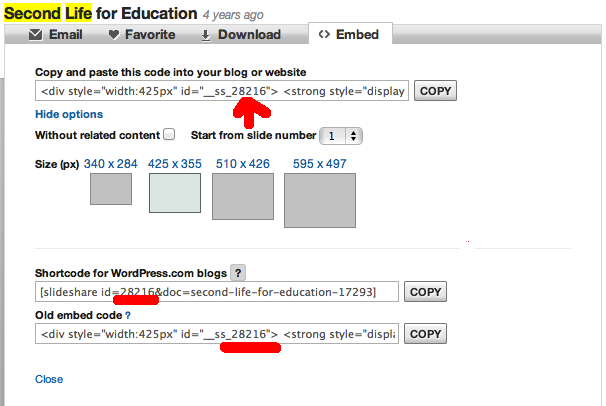
1. Find your favourite SlideShare content, for example, this page.
2. You see 'Embed' button at the right of 'Email', 'Favorite', 'Download', then you click 'Embed' button.
3. Refer the image above, you can see the ID Code 28216 for the Slideshare content.