Simple URL routing in Servlet

I have made a simple URL routing using servlet in Java. Using MainServlet as the front controller, then decide which service to call.

I have defined MainServlet.java as the Front controller, Service.java as the parent base of service, then GiftService.java for the actual service that will be carried out for action. MainServlet.java will be able to examine the URL, for example by the form of /Gift/send , it will call GiftService class and send method in the GiftService.java. Before that it calls the init method inside Service.java to transfer some instance that maybe used by the Services classes, such as HttpServletRequest, HttpServletResponse, and etc.

MainServlet.java

package com.fyhao.test;

import java.io.IOException;
import java.lang.reflect.Constructor;
import java.lang.reflect.Method;

import javax.servlet.ServletException;
import javax.servlet.http.HttpServlet;
import javax.servlet.http.HttpServletRequest;
import javax.servlet.http.HttpServletResponse;

public class MainServlet extends HttpServlet {

    public void doGet(HttpServletRequest request, HttpServletResponse response) throws ServletException, IOException {
        String path = request.getPathInfo();
        try {
            String[] parts = path.split("/");
            if(parts.length >= 2) {
                try {
                    Class iClass = Class.forName("com.fyhao.test." + parts[1] + "Service");
                    Method init;
                    Constructor con;
                    Object myClass;
                    try {
                        init = iClass.getMethod("init", new Class[] {HttpServlet.class, HttpServletRequest.class, HttpServletResponse.class, String[].class});
                        con = iClass.getConstructor(new Class[] {});
                        myClass = con.newInstance(new Object[] {});
                        init.invoke(myClass, new Object[]{this, request, response, parts});
                    } catch (NoSuchMethodException ex) {
                        System.err.println("Please define init method on " + parts[1] + "Service");
                        return;
                    } catch (Exception ex) {
                        System.err.println("init exception");
                        return;
                    }
                    Method m;
                    if(parts.length >= 3) {
                        try {
                            m = iClass.getMethod(parts[2], null);
                            m.invoke(myClass);
                        } catch (NoSuchMethodException ex) {
                            try {
                                m = iClass.getMethod("main", null);
                                m.invoke(myClass);
                            } catch (Exception exc) {
                                System.err.println("Please define a main service method on " + parts[1] + "Service");
                                return;
                            }
                        } catch (Exception ex) {
                            System.err.println("service method exception");
                            return;
                        }
                    } else {
                        try {
                            m = iClass.getMethod("main", null);
                            m.invoke(myClass);
                        } catch (Exception exc) {
                            System.err.println("Please define a main service method on " + parts[1] + "Service");
                            return;
                        }
                    }
                } catch (ClassNotFoundException ex) {
                    defaultAction(request, response);
                }
            } else {
                defaultAction(request, response);
            }
        } catch (NullPointerException ex) {
            defaultAction(request, response);
            return;
        }
        //serviceclass("Gift", "send");
    }
    public void defaultAction(HttpServletRequest request, HttpServletResponse response) throws ServletException, IOException {
        System.out.println("default action here: " + request.getPathInfo());
    }
    // leave for reference
    public void serviceclass(String c, String service) {
        try {
            Class iClass = Class.forName("com.fyhao.test." + c + "Service");
            Method init = iClass.getMethod("init", null);
            Method m = iClass.getMethod(service, null);
            Constructor con = iClass.getConstructor(new Class[] {});
            Object myClass = con.newInstance(new Object[] {});
            m.invoke(myClass);
        } catch( Exception ex) {}
    }
}


Service.java

package com.fyhao.test;

import javax.servlet.http.HttpServlet;
import javax.servlet.http.HttpServletRequest;
import javax.servlet.http.HttpServletResponse;

public class Service {

    HttpServlet servlet;
    HttpServletRequest request;
    HttpServletResponse response;
    String[] parts;
    public void init(HttpServlet servlet, HttpServletRequest request, HttpServletResponse response, String[] parts) {
        this.servlet = servlet;
        this.request = request;
        this.response = response;
        this.parts = parts;
    }
}

GiftService.java

package com.fyhao.test;

import java.io.IOException;

import javax.servlet.ServletException;
import javax.servlet.http.HttpServletRequest;
import javax.servlet.http.HttpServletResponse;

public class GiftService extends Service {

    public void main() {
        System.out.println("default main methods: ");
    }
    public void send() {
        System.out.println("sending");
    }
}


All right, this is the coding done by me during first learning of using java reflection API, which is the great API to directly find the class by the full name, and dynamically initializes and calling its methods. However, I think it would have other better ways of doing this. Please tell me if you know. Thanks.
Doing orm.xml Joincolumn and Cascade

When doing orm.xml, I found that the order of Joincolumn and Cascade should be in order, otherwise it will encountered some problem.

Here is my definition of some classes, Customer and CreditCard.

package com.titan.domain;

import javax.persistence.CascadeType;
import javax.persistence.Entity;
import javax.persistence.GeneratedValue;
import javax.persistence.Id;
import javax.persistence.JoinColumn;
import javax.persistence.OneToOne;
import javax.persistence.Table;

@Entity
@Table(name=”CUSTOMER_TABLE”)
public class Customer implements java.io.Serializable {
    private int id;
    private String firstName;
    private String lastName;
    private Address address;
    private CreditCard creditCard;
    @Id
    @GeneratedValue
    public int getId() {
        return id;
    }
    public void setId(int id) {
        this.id = id;
    }
    public String getFirstName() {
        return firstName;
    }
    public void setFirstName(String firstName) {
        this.firstName = firstName;
    }
    public String getLastName() {
        return lastName;
    }
    public void setLastName(String lastName) {
        this.lastName = lastName;
    }
    @OneToOne(cascade={CascadeType.ALL})
    @JoinColumn(name=”ADDRESS_ID”)
    public Address getAddress() {
        return address;
    }
    public void setAddress(Address address) {
        this.address = address;
    }
    @OneToOne(cascade={CascadeType.ALL})
    @JoinColumn(name=”CREDIT_CARD_ID”)
    public CreditCard getCreditCard() {
        return creditCard;
    }
    public void setCreditCard(CreditCard creditCard) {
        this.creditCard = creditCard;
    }
}


package com.titan.domain;

import java.util.Date;

import javax.persistence.Id;
import javax.persistence.OneToOne;

public class CreditCard implements java.io.Serializable {

    private int id;
    private Date expiration;
    private String number;
    private String name;
    private String organization;
    private Customer customer;
    @Id
    public int getId() {
        return id;
    }
    public void setId(int id) {
        this.id = id;
    }
    public Date getExpiration() {
        return expiration;
    }
    public void setExpiration(Date expiration) {
        this.expiration = expiration;
    }
    public String getNumber() {
        return number;
    }
    public void setNumber(String number) {
        this.number = number;
    }
    public String getName() {
        return name;
    }
    public void setName(String name) {
        this.name = name;
    }
    public String getOrganization() {
        return organization;
    }
    public void setOrganization(String organization) {
        this.organization = organization;
    }
    @OneToOne(mappedBy=”creditCard”)
    public Customer getCustomer() {
        return customer;
    }
    public void setCustomer(Customer customer) {
        this.customer = customer;
    }
}


Here is my orm.xml, placed below META-INF

<entity-mappings   
   xmlns=”http://java.sun.com/xml/ns/persistence/orm”
   xmlns:xsi=”http://www.w3.org/2001/XMLSchema-instance”
   xsi:schemaLocation=”http://java.sun.com/xml/ns/persistence/orm orm_1_0.xsd” 
   version=”1.0″> 
<entity class=”com.titan.domain.Customer” access=”PROPERTY”>
      <attributes>
         <id name=”id”>
            <generated-value/>
         </id>
      <one-to-one name=”creditCard”
                     target-entity=”com.titan.domain.CreditCard”
                     fetch=”LAZY”>
            <join-column name=”CREDIT_CARD_ID”/>
            <cascade>
                <cascade-all />
            </cascade>
         </one-to-one>
      </attributes>
   </entity>
   <entity class=”com.titan.domain.CreditCard” access=”PROPERTY”>
      <attributes>
         <id name=”id”>
            <generated-value/>
         </id>
      <one-to-one name=”customer”
                     target-entity=”com.titan.domain.Customer”
                     mapped-by=”creditCard”/>
      </attributes>
   </entity>

</entity-mappings> 


To note that, cascade element should be below of join-column element, and inside cascade element it contains cascade-all, cascade-persist, cascade-merge, cascade-remove, cascade-refresh

Reference Site: http://markmail.org/message/73xeygrwcslyekwn

Doing Persistence under JBOSS

Just learnt EJB for half month. Just learnt how to create Entity class. When deploys, JBOSS always give me error. Now I found a solution, The problem is sometimes persistence.xml lost the XML Schema, the full persistence.xml can be like this:

<?xml version=”1.0″ encoding=”UTF-8″?>

<persistence
    xmlns=”http://java.sun.com/xml/ns/persistence”
    xmlns:xsi=”http://www.w3.org/2001/XMLSchema-instance”
    xsi:schemaLocation=”http://java.sun.com/xml/ns/persistence http://java.sun.com/xml/ns/persistence/persistence_1_0.xsd”
    version=”1.0″>
    <persistence-unit name=”calculator”>
    <jta-data-source>java:/DefaultDS</jta-data-source>
    <properties>
        <property name=”hibernate.hbm2ddl.auto” value=”create-drop” />
    </properties>
    </persistence-unit>
</persistence>

Hope anyone who faced this problem can solve your problem.

Strange Structure of Method Extend

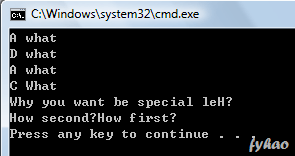
Let see I just built some strange structure of method extend… I want to see how much it can go with different level, where go in where go out. The entrance…

class A {
    public void what() {
        System.out.println("A what");
    }

    public void how() {
        System.out.println("How first?");
    }
}

class B extends A {
    public void how() {
        System.out.print("How second?");
        super.how();
    }
}

class C extends B {
    public void what() {
        System.out.println("C What");
    }

    public void why() {
        System.out.println("Why you want be special leH?");
    }
}

class D extends C {
    public void what() {
        System.out.println("D what");
    }
}

class E extends D {
    public void what() {
        System.out.println("E what");
    }
}

class ExtendMethod {
    public static void main(String args[]) {
        A a = new A();
        a.what();

        C c = new D();
        c.what();

        A someElse = new B();
        someElse.what();

        B someThingElse = new C();
        someThingElse.what();

        B someSpecial = new C();
        //someSpecial.why();

        D someThingSpecial = new E();
        someThingSpecial.why();

        C c2e = new E();
        c2e.how();
    }
}

Java Method Extend

Playing around with Initialization of Final Variables

Final variables declared inside class, it can be divided into final variable, or static final variable.

These two types have two different initialization method.

For final variable, the first type, we should declare it in constructor, or initializer block.

For static final variable, the second type, we should declare it in static initializer block.

These two methods unless you initialized them when you declare. I mean final int a = 3; you directly assign a number 3 to it.

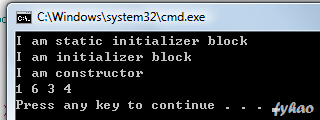
Now, I am playing around with initialization of final variables, as the below is my coding, you all can refer it…

public class FinalStuff {
    final int a;

    static final int d;

    // use static initializer block to initialize static final int
    static {
        c = 3;
        d = 4;
        System.out.println("I am static initializer block");
    }
    static final int c;

    {
            a = 1 + this.b;
            b = 2 + this.d;
            System.out.println("I am initializer block");
    }
    final int b;
    // use initializer block OR FinalStuff constructor to initialize final int
    public FinalStuff() {
        //a = 1;
        //b = 2;
        System.out.println("I am constructor");
    }

    public static void main(String args[]) {
        FinalStuff f = new FinalStuff();
        System.out.println(f.a + " " + f.b + " " + f.c + " " + f.d);
    }
}


Java Final, Static, Initializer Block

Play around with Enum

Enum is a new Java SE 5 features. It seem likes able to declare a new type, with limited specified value. Below is the demonstration of Enum.

enum Car {
    TOYOTA (30000,1000,"BIG"),
    CAMRY (100000,200,"BIG") {
        public int totalPrice() {
            return price * unit + 1500;
        }
    },
    PROTON (10000,5000,"MEDIUM");

    final int price;
    final int unit;
    final String size;

    Car(int price, int unit, String size) {
        this.price = price;
        this.unit = unit;
        this.size = size;
    }

    public int getPrice() { return price; }
    public int getUnit() { return unit; }
    public String getSize() { return size; }

    public int totalPrice() {
        return price * unit;
    }

    public String toString() {
        return "PRICE: " + price + "\tUNIT: " + unit + "\tSIZE: " + size;
    }
}

public class EnumPlay {
    public static void main(String args[]) {
        Car c1 = Car.TOYOTA;
        Car c2 = Car.CAMRY;
        Car c3 = Car.PROTON;

        for(Car c : Car.values()) {
            System.out.println(c.name()+ "\n" + c + "\nTotal: " + c.totalPrice() + "\n");
        }

        System.out.println("Split it up:");
        System.out.println(c1.name() + " has " + c1.getUnit() + " cars. Each price costs " + c1.getPrice() + ". But somehow it is " + c1.getSize().toLowerCase());
        System.out.println(c2.name() + " has " + c2.getUnit() + " cars. Each price costs " + c2.getPrice() + ". But somehow it is " + c2.getSize().toLowerCase());
        System.out.println(c3.name() + " has " + c3.getUnit() + " cars. Each price costs " + c3.getPrice() + ". But somehow it is " + c3.getSize().toLowerCase());
    }
}

Java Enum Tutorial

Using Java String Formatting printf, format

Note that, System.out.printf and System.out.format is exactly the same, the Java engineer come out with System.out.printf may be want to make C Programmer happy.

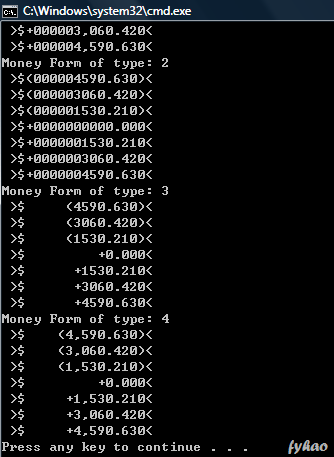
Now, I am going to use this System.out.printf to format my money, in account book, for example, there are different type of formatting. I now tied up with my code, and the output let you to see what happen in this.

import java.util.*;
import java.text.*;

class MoneyForm {
    private double amount;
    private int type;
    public MoneyForm(double amount, int type) {
        this.amount = amount;
        this.type = type;
    }

    public void generateForm() {
        switch(type) {
            case 0:
            System.out.printf(" >$%1$-+,(15.3f< ", amount);
            break;
            case 1:
            System.out.printf(" >$%1$0+,(15.3f< ", amount);
            break;
            case 2:
            System.out.printf(" >$%1$0+(15.3f< ", amount);
            break;
            case 3:
            System.out.printf(" >$%1$+(15.3f< ", amount);
            break;
            case 4:
            System.out.printf(" >$%1$+,(15.3f< ", amount);
            break;
        }

        System.out.println();
    }
}

class Money {
    public static void main(String args[]) {
        for(int i=0; i<5; i++)
            printMoney(i);
    }

    public static void printMoney(int type) {
        System.out.println("Money Form of type: " + type);
        for(int i=-3; i<=3; i++)
            new MoneyForm(i * 1530.21, type).generateForm();

    }
}

System.out.printf Java Formatting

Equal and NOT Equal in Integer?

I just discovered one strange and interesting thing. I get confused when first seeing this one.

How about I write this code?

Integer i1 = 1000;
Integer i2 = 1000;
System.out.println(i1==i2);

It will return "false". Whenever the Integer is a wrapper class, so it will belongs to different objects.

How about this one?

Integer i3 = 10;
Integer i4 = 10;
System.out.println(i3==i4);

It will return "TRUE". Why? Why show two different results, one return false the other return true. But how come, it is same concept!!!

Confusing?

The answer is, in order to save memory, two instances of the following wrapper objects will always be == when their primitive value are the same.

  • Boolean
  • Byte
  • Character from \u0000 to \u007f (7f is 127 in decimal)
  • Short and Integer from -128 to 127.

Yes, I know it, in order to save memory, so it become like that. So why first time I see it I will get confused, is it the book talk wrong thing? Not! I try in my machine, it showed the same result.

If I not see this, if the Sun Exam come out this question, I definite will… So I need to be very very careful about this. Since Java 5 the creator of Java is giving programmer more convenient way to construct code, so it may be some things not following logic, so as a testtaker we need to be very careful about this.

Sort Student Data using Comparable and Comparator

This is the demonstration on how to use java.util.Comparable and java.util.Comparator to sort data. In this example, I would using some example of student data, to sort it using both ways.

Comparable is an interface under java.util, the class of the student data must implements it, in order using Collections.sort() to sort it. The programmer need to implements the compareTo() method in order to achieve it.

Comparator is another interface under java.util, it provide more flexibility in sorting the data in many ways. With using Comparator,  the programmer is required to make another class which implements Comparator but no implements on class of student data. The benefits are we need not to modify the class of data being sorted, and also we can create as more as possible the Comparator class, provide many sorting method. Lastly, the programmer need to implements the compare() method in order to achieve it.

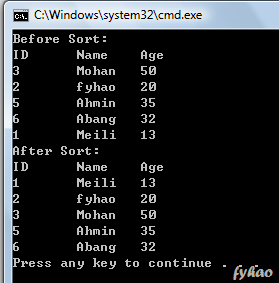
Here I using the Comparable to sort the Student Data. Below is the code and the output.

import java.util.*;

// Demonstrate using Comparable to sort the student data based on ID, Name, Age

class Student implements Comparable<Student> {
    private int ID;
    private String name;
    private int age;

    public Student(int i, String s, int a) {
        ID = i;
        name = s;
        age = a;
    }

    public int getID() {return ID;}
    public String getName() {return name;}
    public int getAge() {return age;}

    public int compareTo(Student stu) {
        // sort based on ID
        return this.ID – stu.ID;
    }

    public String toString() {
        return ID + "\t" + name + "\t" + age;
    }
}

public class StudentData {
    public static void main(String args[]) {
        List<Student> list = new ArrayList<Student>();
        list.add(new Student(3,"Mohan",50));
        list.add(new Student(2,"fyhao",20));
        list.add(new Student(5,"Ahmin",35));
        list.add(new Student(6,"Abang",32));
        list.add(new Student(1,"Meili",13));

        System.out.println("Before Sort:\nID\tName\tAge");
        for(Student stu : list) {
            System.out.println(stu);
        }

        Collections.sort(list);

        System.out.println("After Sort:\nID\tName\tAge");
        for(Student stu : list) {
            System.out.println(stu);
        }
    }
}


image

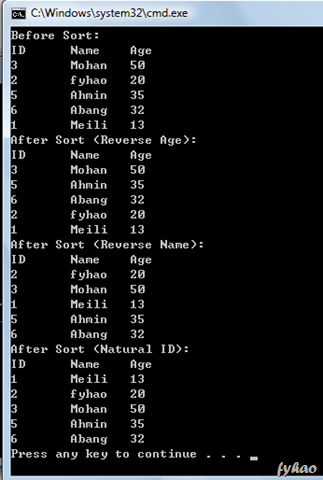
Where below is the implementation of the code using Comparator to sort it. I demonstrated it using three different sorting method, you all can check it out from below the code and the output.

import java.util.*;

// Demonstrate using Comparator to sort the student data based on ID, Name, Age

class Student {
    private int ID;
    private String name;
    private int age;

    public Student(int i, String s, int a) {
        ID = i;
        name = s;
        age = a;
    }

    public int getID() {return ID;}
    public String getName() {return name;}
    public int getAge() {return age;}

    public String toString() {
        return ID + "\t" + name + "\t" + age;
    }
}

class reverseAge implements Comparator<Student> {
    public int compare(Student s1, Student s2) {
        return s2.getAge() – s1.getAge();
    }
}

class reverseAlphabetical implements Comparator<Student> {
    public int compare(Student s1, Student s2) {
        return s2.getName().compareTo(s1.getName());
    }
}

class naturalID implements Comparator<Student> {
    public int compare(Student s1, Student s2) {
        return s1.getID() – s2.getID();
    }
}

public class StudentData {
    public static void main(String args[]) {
        List<Student> list = new ArrayList<Student>();
        list.add(new Student(3,"Mohan",50));
        list.add(new Student(2,"fyhao",20));
        list.add(new Student(5,"Ahmin",35));
        list.add(new Student(6,"Abang",32));
        list.add(new Student(1,"Meili",13));

        System.out.println("Before Sort:\nID\tName\tAge");
        for(Student stu : list) {
            System.out.println(stu);
        }

        Collections.sort(list, new reverseAge());

        System.out.println("After Sort (Reverse Age):\nID\tName\tAge");
        for(Student stu : list) {
            System.out.println(stu);
        }

        Collections.sort(list, new reverseAlphabetical());

        System.out.println("After Sort (Reverse Name):\nID\tName\tAge");
        for(Student stu : list) {
            System.out.println(stu);
        }

        Collections.sort(list, new naturalID());

        System.out.println("After Sort (Natural ID):\nID\tName\tAge");
        for(Student stu : list) {
            System.out.println(stu);
        }
    }
}


image

All right, any more questions about this? I will waiting for your reply.

Play Around with Generic Collection

I currently doing some sample or experiments about generic collection, a new thing added in Java SE 5. It is very interesting but a bit complex, so I need to deep study about it.

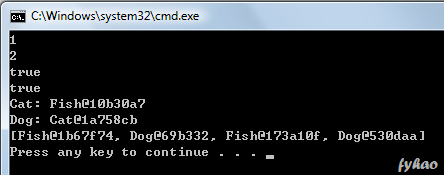
Here is my code and the interface shown.

import java.util.*;

class Some {
    public <T> T getCode(T n) {
        return n;
    }
}

abstract class Animal<E> {
    abstract void eat(E x);
}

class Fish<E extends Animal> extends Animal<E> {
    public void eat(E x) {
        System.out.println("Fish: " + x);
    }
}

class Cat<E extends Fish> extends Animal<E> {
    public void eat(E x) {
        System.out.println("Cat: " + x);
    }
}

class Dog<E extends Animal> extends Animal<E> {
    public void eat(E x) {
        System.out.println("Dog: " + x);
    }
}

class MyEatList {
    public void addFish(List<? super Fish> list) {
        list.add(new Fish());
    }

    public void addDog(List<? super Dog> list) {
        list.add(new Dog());
    }

}

class GenericClass {
    public static void main(String args[]) {
        Some s = new Some();
        System.out.println(s.getCode(1));
        System.out.println(s.getCode("2"));
        System.out.println((s.getCode(1) instanceof Integer));
        System.out.println(s.getCode("2") instanceof String);

        Cat<Fish> c = new Cat<Fish>();
        c.eat(new Fish());

        Dog<Cat> d = new Dog<Cat>();
        d.eat(new Cat());

        List<Animal> eatList = new ArrayList<Animal>();
        MyEatList menu = new MyEatList();
        menu.addFish(eatList);
        menu.addDog(eatList);
        menu.addFish(eatList);
        menu.addDog(eatList);
        System.out.println(eatList);
    }
}

image